
Tutorial for the serial Com-Server:
Via Com-Server onto S7-PPI network
Up- and downloading of controller programs as well as status monitoring are handled with the Siemens S7-200 using the PPI interface. Connection to the PC used as a programming device is frequently implemented using the RS232/PPI Multi-Master cable. To extend this connection to a physically remote computer or to access from different work stations, a special serial cable with line drivers and if necessary a manual switcher generally needs to be installed. Alternative use of an Ethernet CP would necessitate modifying the S7 project/programm file. In addition, each individual PLC would needs its own CP.
Use of a Com-Server on the other hand provides a simple solution that works without any modifications to the controller program and usually eliminates any cabling expense: The RS232/PPI Multi-Master Cable is coinnected to the Com-Server instead of the PC. You install the COM Port Redirector on the PC and then simply tell Step7/Microwin on which virtual COM port it should look for the controller components - that’s it. The serial data are tunneled to the Com-Server and the controllers connected to it via TCP/IP or even over the Internet if needed.

The three essential steps are as follows:
-
The Com-Server is connected to the RS232/PPI Multi-Master Cable and the network.
-
The COM Port Redirector is used to create a virtual COM port on the STEP7 PCs.
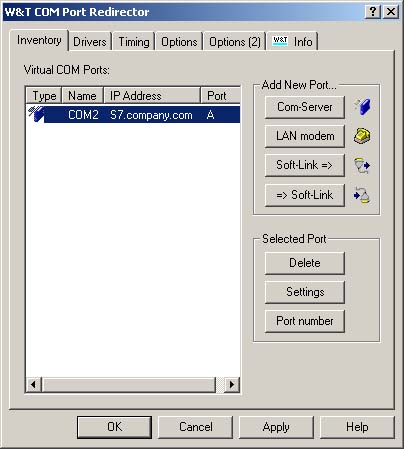
-
In STEP7/Microwin the virtual COM port is defined as the interface for communication with the S7.
Hard-/software versions used in the test:
- Step7 Version 4.0.1.10
- RS232/PPI Multi-Master Cable
- S7-200 CPU 222 Rel. 02.00
- Com-Server 58631, FW 1.46
- COM Port Redirector 2.52